Shopping Cart Database Design: Complete Schema for Laravel E-Commerce (Tables, Indexes, Relationships)


TL;DR: A production shopping cart needs four tables — carts, cart_items, cart_coupons, and cart_abandonments. The two constraints that matter most are a composite unique on (identifier, instance) for the cart header and a composite unique on (cart_id, row_id) for line items. Get those wrong and you will be writing repair migrations against live data.
This is the shopping cart database design running in production on a live Laravel storefront since November 2025: four tables, about forty columns, and a handful of composite indexes that are doing more work than they look like they are. Below is every table, every index, why each one exists, and the three decisions I would make differently if I started again.
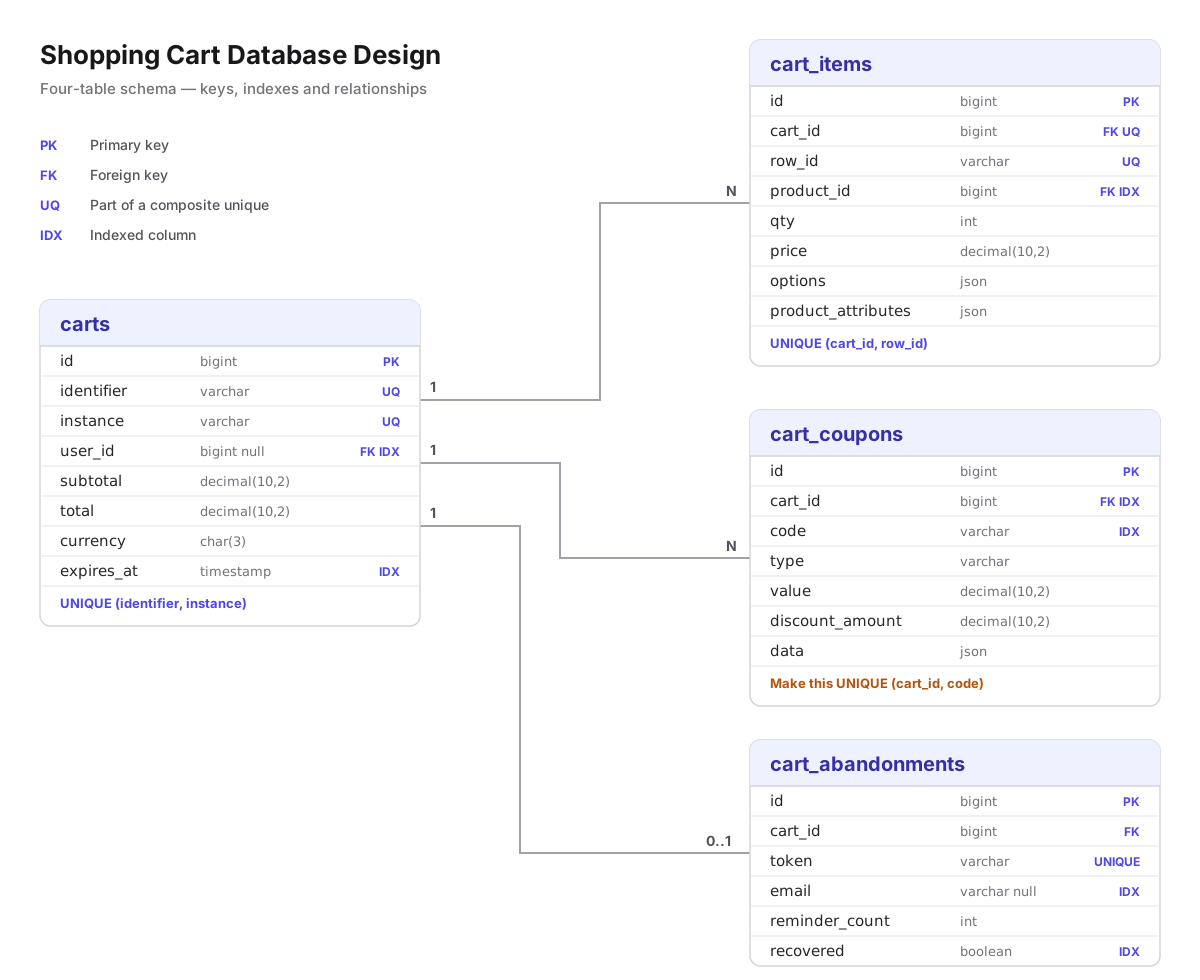
The four tables at a glance
| Table | Responsibility | Rows per cart |
|---|---|---|
carts | Header: owner identity, totals, currency, expiry, status | 1 |
cart_items | Line items with pre-computed totals and a product snapshot | 1 per product/option combination |
cart_coupons | Applied codes and their computed discount values | 0–n |
cart_abandonments | Abandonment lifecycle: email state, recovery token, attribution | 0–1 |
The split matters. A single carts table with a JSON blob works until you need to query "which carts contain product 412 and were abandoned in the last 48 hours" — then you are doing full table scans over JSON on every marketing run.
Table 1 — carts
Schema::create('carts', function (Blueprint $table) {
    $table->id();
    $table->string('identifier');                  // user ID or session ID
    $table->string('instance')->default('cart');   // 'cart', 'wishlist', 'quote'
    $table->text('content')->nullable();           // legacy serialized payload
    $table->foreignId('user_id')->nullable()->constrained()->onDelete('cascade');
    $table->string('coupon_code')->nullable();
    $table->decimal('discount_amount', 10, 2)->default(0);
    $table->decimal('tax_amount', 10, 2)->default(0);
    $table->decimal('shipping_amount', 10, 2)->default(0);
    $table->decimal('subtotal', 10, 2)->default(0);
    $table->decimal('total', 10, 2)->default(0);
    $table->text('notes')->nullable();
    $table->string('currency', 3)->default('USD');
    $table->timestamps();
    $table->timestamp('expires_at')->nullable();

    $table->unique(['identifier', 'instance']);
    $table->index(['user_id', 'instance']);
    $table->index('expires_at');
});
Why identifier and instance instead of just user_id
This is the single most important decision in the schema, and almost every tutorial gets it wrong by making user_id the cart owner.
A cart exists before a user does. A guest browsing your store has a session ID and no account. If user_id is your only owner column, you cannot persist a guest cart at all without nullable-owner special cases leaking through every query.
identifier holds whichever identity currently owns the cart — the session ID for a guest, the user ID once they authenticate. instance lets the same table serve carts, saved-for-later lists, and quotes without a discriminator table.
The composite unique is what makes guest-to-user merge safe:
$table->unique(['identifier', 'instance']);One identity gets exactly one cart per instance. When a guest logs in, you fetch their session cart and their user cart, merge the items, and delete the loser. Without that constraint two concurrent tabs will happily create two carts for the same session, and your merge logic will silently drop items.
The content column is a compromise, not a pattern
The content TEXT column holds a serialized cart payload, and it coexists with the fully normalized cart_items table. That is redundant, and it is redundant on purpose: it is what remains of the package-based cart this store started on, kept during the migration so old sessions did not vaporize on deploy day.
Do not copy it into a greenfield schema. I am showing it because production schemas carry this kind of scar tissue and pretending otherwise is how tutorials mislead people. If you inherit a column like this, the exit path is to backfill cart_items from it, stop writing to it, then drop it in a later release — three deploys, not one.
Money columns
decimal(10, 2) throughout. Never float: binary floating point cannot represent 0.10 exactly, and cart totals that drift by a cent are the kind of bug that surfaces in an accounting reconciliation six months later. Ten digits with two decimals caps a line at 99,999,999.99, which is comfortable for retail.
Storing integer minor units (cents) is the stricter alternative and worth it if you handle multiple currencies with different exponents. This store is single-currency-per-cart, so decimal stays.
Why the totals are denormalized
subtotal, tax_amount, shipping_amount, discount_amount, and total could all be derived by summing cart_items. They are stored anyway, because the cart badge and the mini-cart render on every page load. Summing child rows on every request to display "$142.50" is a join you pay for a few million times a month for no benefit.
The tradeoff is that these columns can drift from their children. Recalculate them in one place — a single recalculate() method on the cart model, called from every mutation — and never write them from a controller.
Table 2 — cart_items
Schema::create('cart_items', function (Blueprint $table) {
    $table->id();
    $table->foreignId('cart_id')->constrained()->onDelete('cascade');
    $table->string('row_id');                       // hash of product + options
    $table->foreignId('product_id')->constrained()->onDelete('cascade');
    $table->string('name')->nullable();
    $table->integer('qty');
    $table->decimal('price', 10, 2)->nullable()->default(0);
    $table->decimal('tax_rate', 5, 2)->default(0);
    $table->decimal('tax_amount', 10, 2)->default(0);
    $table->decimal('discount_amount', 10, 2)->default(0);
    $table->decimal('subtotal', 10, 2)->default(0);
    $table->decimal('total', 10, 2)->default(0);
    $table->json('options')->nullable();            // size, colour, engraving
    $table->json('product_attributes')->nullable(); // snapshot at add time
    $table->timestamps();

    $table->unique(['cart_id', 'row_id']);
    $table->index(['cart_id', 'product_id']);
    $table->index('row_id');
});
row_id is the column tutorials skip
The obvious design is unique(['cart_id', 'product_id']) — one row per product per cart. It is wrong the moment you sell anything with variations.
A customer buying the same t-shirt in medium black and large white is buying one product_id across two distinct lines. They need separate quantities, separate removal, separate pricing. A unique on product_id makes that impossible and forces you into an ugly "merge the quantities" fallback that loses the customer's actual intent.
row_id is a deterministic hash of the product ID plus the normalized options:
protected function generateRowId(int $productId, array $options): string
{
    ksort($options); // order must not affect identity

    return md5($productId . serialize($options));
}
The ksort matters. Without it, ['size' => 'M', 'color' => 'black'] and ['color' => 'black', 'size' => 'M'] hash differently and your customer ends up with two identical lines. The unique on (cart_id, row_id) then does the deduplication in the database: adding the same variant twice becomes a quantity increment, not a second row.
product_attributes freezes the product at add time
Prices change. Products get renamed, restocked, and discontinued. If your cart joins to products for the display name and price at render time, then a price change mid-session silently rewrites what the customer thought they were buying.
product_attributes stores a JSON snapshot — name, price, SKU, thumbnail, tax class — as it existed when the item went in the cart. The cart renders from the snapshot. Checkout re-validates against the live product and surfaces any delta explicitly ("the price of this item changed"), which is both honest and, in several jurisdictions, required.
It also means a deleted product does not blank out historical carts.
tax_rate is decimal(5,2)
Five digits, two decimals: up to 999.99. Rates are stored per line rather than per cart because mixed baskets are normal — food at 5%, electronics at 20% — and a single cart-level rate cannot represent that.
Table 3 — cart_coupons
Schema::create('cart_coupons', function (Blueprint $table) {
    $table->id();
    $table->foreignId('cart_id')->constrained()->onDelete('cascade');
    $table->string('code');
    $table->string('type');                        // percentage, fixed, shipping
    $table->decimal('value', 10, 2);               // the coupon's configured value
    $table->decimal('discount_amount', 10, 2);     // what it actually took off
    $table->json('data')->nullable();              // coupon definition snapshot
    $table->timestamps();

    $table->index(['cart_id', 'code']);
});
Two money columns, because they answer different questions. value is the coupon's configuration — "15%". discount_amount is what it actually removed from this specific cart — "$21.40". You need both: the first to explain the coupon, the second to reconcile the total without recomputing promotion logic.
The data snapshot exists for the same reason as product_attributes. Marketing edits coupons. A coupon that was 15% in March and 10% in April must still explain a March order correctly.
A constraint this table is missing
Look at that last line. It is an index on (cart_id, code), not a unique. Nothing at the database level stops the same coupon being applied to the same cart twice.
In this codebase the service layer guards it, so it has never fired in production. That is not the same as being safe: a retry, a double-submitted form, or a second worker processing the same request can all slip past an application-level check that the database would have rejected outright. If you are building this fresh, make it unique:
$table->unique(['cart_id', 'code']);Table 4 — cart_abandonments
Schema::create('cart_abandonments', function (Blueprint $table) {
    $table->id();
    $table->foreignId('cart_id')->constrained()->onDelete('cascade');
    $table->string('email')->nullable();
    $table->string('phone')->nullable();
    $table->string('token')->unique();
    $table->boolean('email_sent')->default(false);
    $table->timestamp('email_sent_at')->nullable();
    $table->boolean('recovered')->default(false);
    $table->timestamp('recovered_at')->nullable();
    $table->integer('reminder_count')->default(0);
    $table->timestamp('last_reminder_sent_at')->nullable();
    $table->json('customer_data')->nullable();
    $table->timestamps();

    $table->index('email');
    $table->index('recovered');
    $table->index('created_at');
});
token is the unguessable string in the recovery link. It is unique because it is a lookup key — one token resolves to exactly one abandoned cart. Generate it with Str::random(64), never from the cart ID.
reminder_count and last_reminder_sent_at exist because recovery is a sequence, not an event. The pattern that works is three touches — one hour, twenty-four hours, seventy-two hours — and both columns are what let a scheduled job pick the right message without re-deriving state from the mail log.
email and phone are nullable and separate from the user record because most abandoned carts belong to guests who typed an email at checkout and never finished. That half-captured email is the entire point of the table.
One index here is redundant
The production version of this migration also declares $table->index('token') alongside $table->unique('token'). A unique constraint is an index in MySQL, so that creates two B-trees on the same column: double the write cost, zero read benefit. It is omitted above. Check your own schema for this — it is an easy thing to add twice and it never announces itself.
The same schema in plain SQL
If you are not on Laravel, the design translates directly. The constraints, not the framework, are the substance:
CREATE TABLE carts (
    id              BIGINT UNSIGNED NOT NULL AUTO_INCREMENT,
    identifier      VARCHAR(255)    NOT NULL,
    instance        VARCHAR(255)    NOT NULL DEFAULT 'cart',
    user_id         BIGINT UNSIGNED NULL,
    coupon_code     VARCHAR(255)    NULL,
    discount_amount DECIMAL(10,2)   NOT NULL DEFAULT 0,
    tax_amount      DECIMAL(10,2)   NOT NULL DEFAULT 0,
    shipping_amount DECIMAL(10,2)   NOT NULL DEFAULT 0,
    subtotal        DECIMAL(10,2)   NOT NULL DEFAULT 0,
    total           DECIMAL(10,2)   NOT NULL DEFAULT 0,
    currency        CHAR(3)         NOT NULL DEFAULT 'USD',
    expires_at      TIMESTAMP       NULL,
    created_at      TIMESTAMP       NULL,
    updated_at      TIMESTAMP       NULL,
    PRIMARY KEY (id),
    UNIQUE KEY carts_identifier_instance_uq (identifier, instance),
    KEY carts_user_instance_idx (user_id, instance),
    KEY carts_expires_at_idx (expires_at),
    CONSTRAINT carts_user_id_fk FOREIGN KEY (user_id)
        REFERENCES users (id) ON DELETE CASCADE
) ENGINE=InnoDB;

CREATE TABLE cart_items (
    id                 BIGINT UNSIGNED NOT NULL AUTO_INCREMENT,
    cart_id            BIGINT UNSIGNED NOT NULL,
    row_id             VARCHAR(255)    NOT NULL,
    product_id         BIGINT UNSIGNED NOT NULL,
    name               VARCHAR(255)    NULL,
    qty                INT             NOT NULL,
    price              DECIMAL(10,2)   NULL DEFAULT 0,
    tax_rate           DECIMAL(5,2)    NOT NULL DEFAULT 0,
    tax_amount         DECIMAL(10,2)   NOT NULL DEFAULT 0,
    discount_amount    DECIMAL(10,2)   NOT NULL DEFAULT 0,
    subtotal           DECIMAL(10,2)   NOT NULL DEFAULT 0,
    total              DECIMAL(10,2)   NOT NULL DEFAULT 0,
    options            JSON            NULL,
    product_attributes JSON            NULL,
    created_at         TIMESTAMP       NULL,
    updated_at         TIMESTAMP       NULL,
    PRIMARY KEY (id),
    UNIQUE KEY cart_items_cart_row_uq (cart_id, row_id),
    KEY cart_items_cart_product_idx (cart_id, product_id),
    CONSTRAINT cart_items_cart_id_fk FOREIGN KEY (cart_id)
        REFERENCES carts (id) ON DELETE CASCADE
) ENGINE=InnoDB;
What each index is actually for
| Index | Query it serves |
|---|---|
carts (identifier, instance) UNIQUE | Every cart load. Also the guest-merge safety constraint. |
carts (user_id, instance) | "Show this user's saved lists" in account pages. |
carts (expires_at) | The nightly prune job. Without it, cleanup scans the table. |
cart_items (cart_id, row_id) UNIQUE | Add-to-cart dedup. The hot path. |
cart_items (cart_id, product_id) | "Which carts hold product X" — stock and marketing queries. |
cart_abandonments (recovered) | The scheduled job selecting carts still needing a reminder. |
cart_abandonments (created_at) | Time-windowed abandonment reporting. |
Every index is a tax on every write. The pruning job index earns its keep because carts are written far less often than they are read; a boolean index on recovered earns it because the scheduler runs constantly against a table that is overwhelmingly already-recovered rows.
Five mistakes that force a repair migration
- Making
user_idthe cart owner. Guest carts become impossible and you retrofitidentifierlater, against live rows, with no way to reconstruct which session owned what. - Unique on
(cart_id, product_id). Works until the first product variant ships, then requires rebuilding line identity for every existing cart. - Joining to
productsfor cart display. A price change rewrites carts in flight. Snapshot at add time. - Float for money. The drift is invisible for months and unfixable in retrospect, because you no longer know which totals were correct.
- No
expires_at. The table grows without bound, and adding a prune later means deleting millions of rows against a table with no index to find them.
What I would change
Three things, having run this for eight months.
Make cart_coupons (cart_id, code) unique. Covered above. The application guard has held, but the database should not be relying on it.
Add a status column from day one. This schema got order_id and status bolted on two weeks after launch, because "active / converted / abandoned / expired" turns out to be the axis every report queries. Retrofitting a status column means backfilling it from inference, and inference is never fully right.
Store minor units instead of decimal. Single-currency made decimal defensible. The moment a second currency with a different exponent appears, integer cents stops being a preference and becomes the only correct answer.
Where this fits
This schema is the foundation for four things I have written up separately: session persistence, real-time cart count broadcasting with Reverb, abandonment tracking and recovery emails, and merging a guest cart into a user account at login.
The guest-merge article is the one that depends most directly on what is above — the (identifier, instance) unique is the constraint that makes the merge safe rather than best-effort.
Frequently Asked Questions
Should the shopping cart be owned by user_id or session ID?
Why can I not put a unique constraint on (cart_id, product_id)?
Should I store cart money as decimal or integer cents?
How do I stop product prices changing under a customer mid-session?
How many tables does a production shopping cart need?

Senior Full Stack Developer · Building SaaS products & teaching Laravel/React · 10+ years experience · Founder of Orion360 · Based in Dubai, UAE.
Content Hub
Shopping Cart Database Design: Complete Schema for Laravel E-Commerce (Tables, Indexes, Relationships)- PHP Shopping Cart Session Management Best Practices: Hybrid Session + Database Persistence in Laravel
- How to keep Session-Based Shopping Cart with Database Persistence
- Real-Time Shopping Cart Count with Laravel Reverb: Broadcast Cart Updates via WebSockets
- Laravel Cart Abandonment: Detect, Track and Recover Lost Sales with Automated Email Reminders
- Merging Guest and Authenticated User Carts in Laravel: Session-to-Database Sync on Login
- 5 Laravel Migration Mistakes That Made It Into Production (and How to Repair Them)
Was this post helpful?